Showing posts with label Apple. Show all posts

Email account setup on iPhone (SMTP/IMAP/POP3)

Email account setup on iPhone (SMTP/IMAP/POP3)

Follow these step-by-step instructions to set up your Namecheap Private Email account on your iPhone:

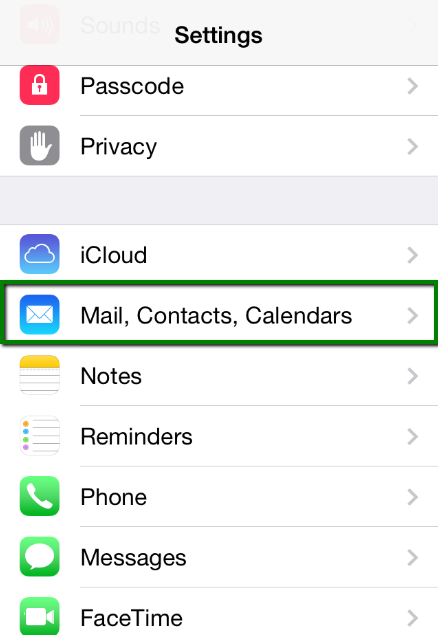
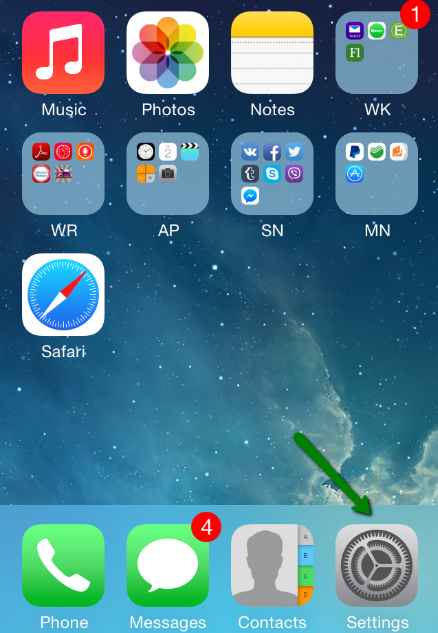
1. Select Settings from the home screen of your iPhone: 

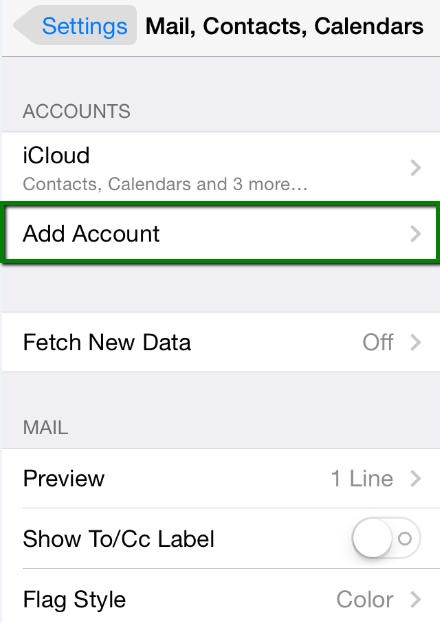
2. Choose Mail, Contacts, Calendars and click Add Account


3. Choose Other from the list that appears: 
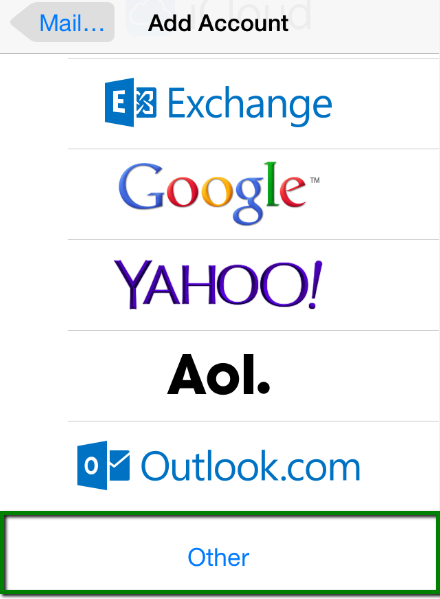

4. Select Add Mail Account. In the New Account menu, you will need to specify the following records: 

  • Name – your name (will appear as sender name) 
  • Address – your full email address, as created with Namecheap Private Email 
  • Password – the password for this email address 
  • Description – lets you specify any description (we suggest you use your email address)
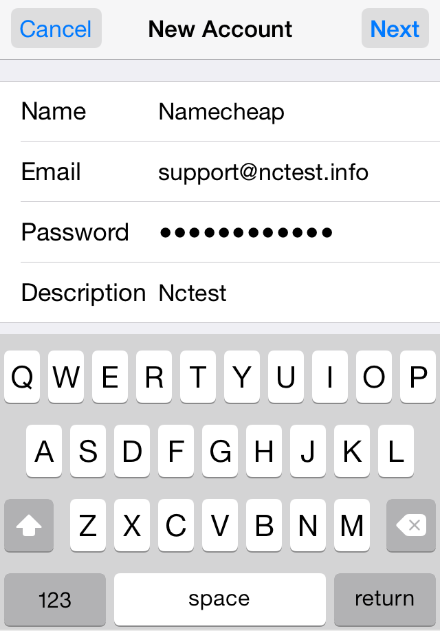

Click Next

5. Select protocol type: IMAP or POP3. We advise you to use IMAP. Your selection will be highlighted blue. 

6. Settings are the same for both IMAP and POP3: 

  • NameAddress and Description: should have been already filled in
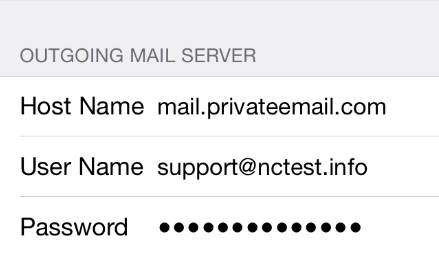
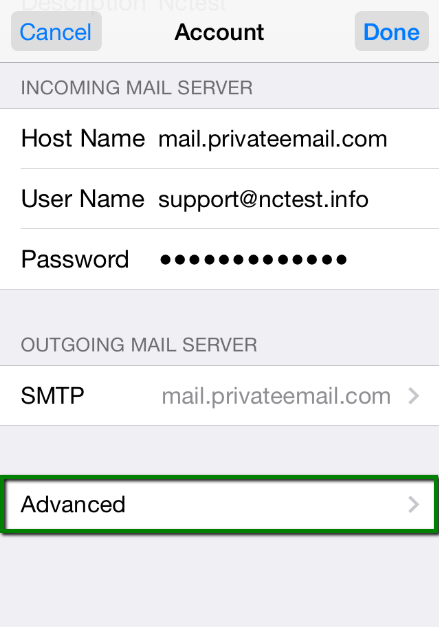
  • Host name: mail.privateemail.com 
  • User Name: your email address
  • Password: password for your email

In the fields for both Incoming Mail Server and Outgoing Mail Server, indicate the following settings: 
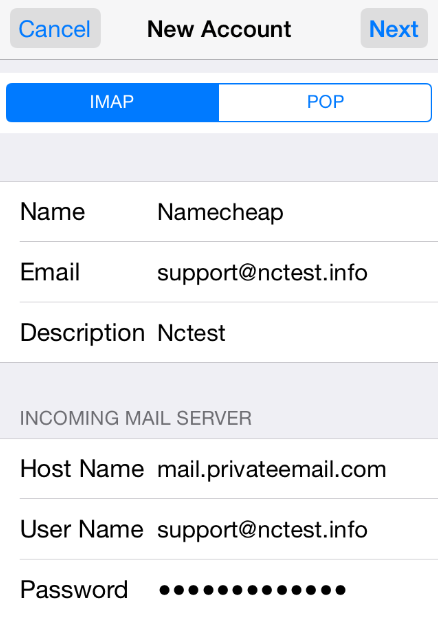

Click Next

7. If you use IMAP, you can enable the following services: 
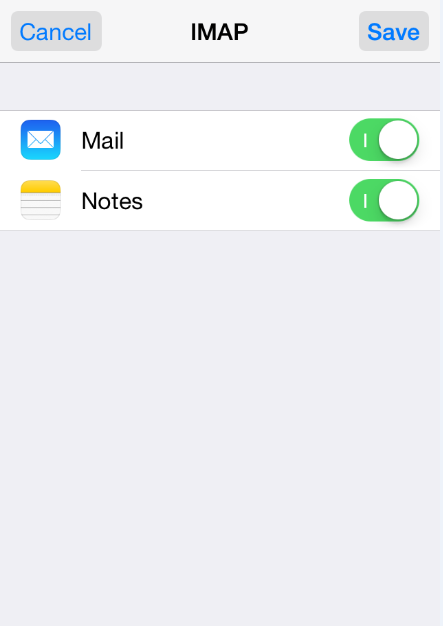

Click Save and wait while the system completes necessary checks. 

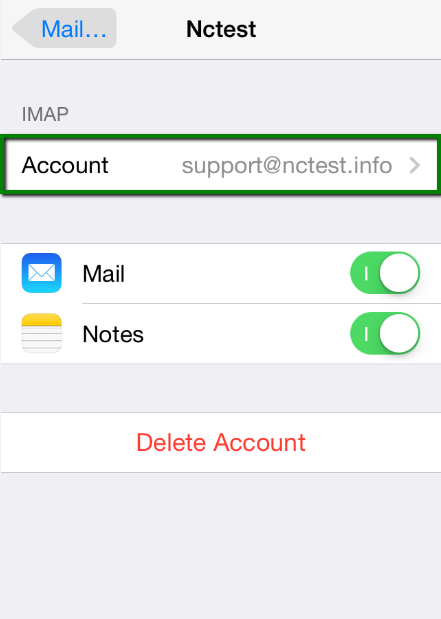
8. When the checks are finished, you'll be redirected to the Mail, Contacts, Calendars screen. Choose your newly created account there: 
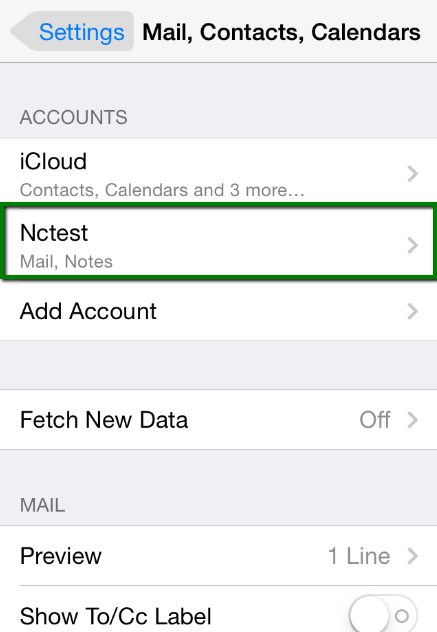


9. Scroll down and select Advanced


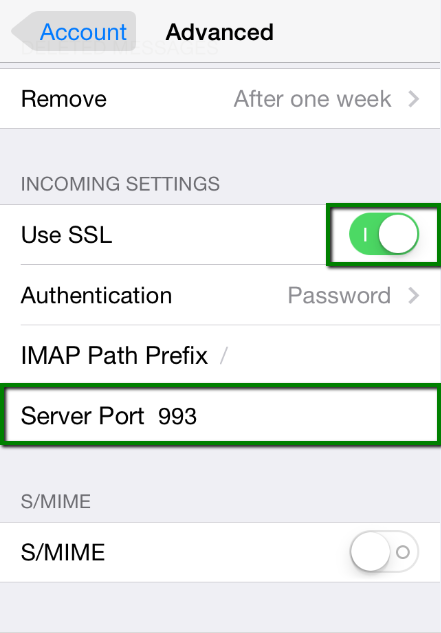
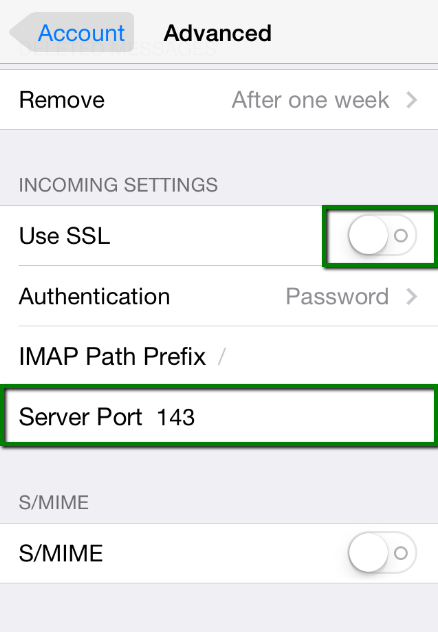
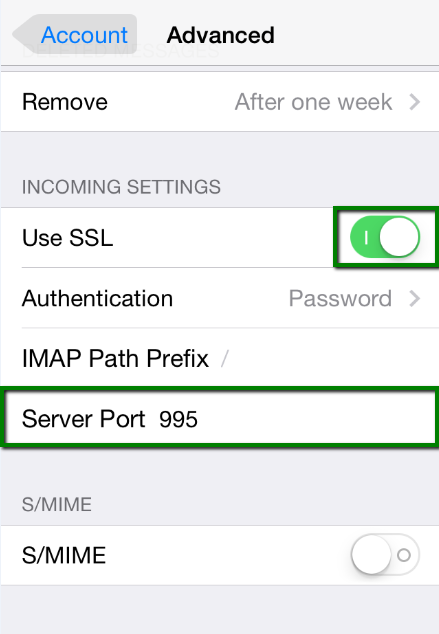
10. Here you can choose additional settings for IMAP or POP3

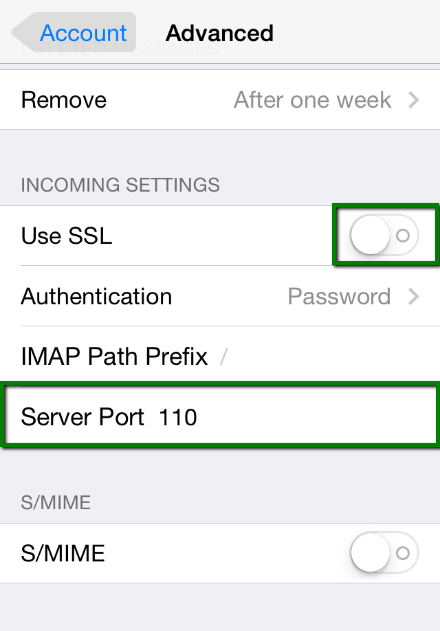
If you set IMAP connection, you need to use port 993 (with SSL) or port 143 (without SSL)
Set IMAP Path Prefix to INBOX


or 


If you chose POP3, you need to use port 995 (with SSL) or port 110 (without SSL)


or 


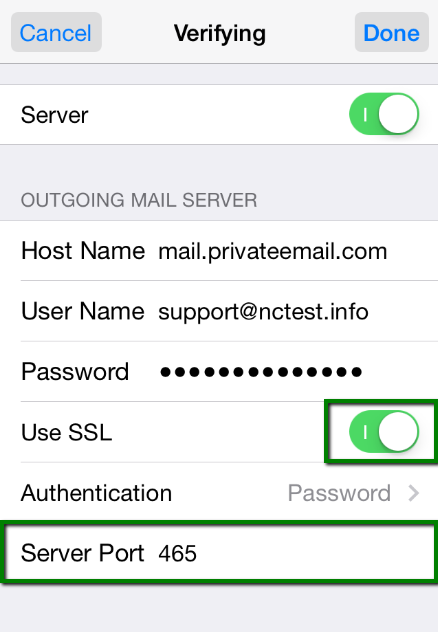
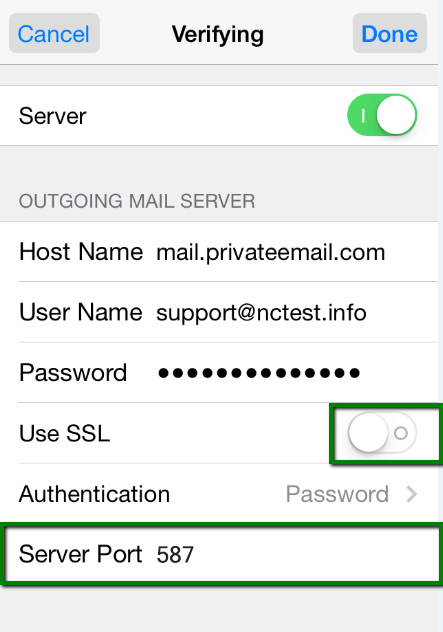
11. In order to set up additional settings for outgoing server, you will need to return in the previous menu and then go to Outgoing Mail Server by clicking on the host name of the server: 
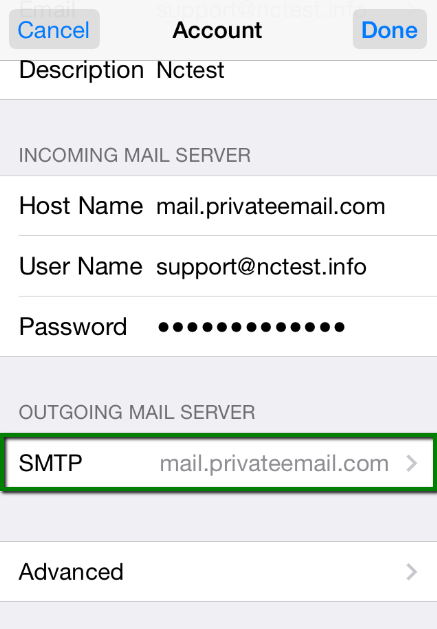

12. For Outgoing Server (SMTP), select port 465 (with SSL) or port 587 (without SSL)


or 


Once the settings are verified, your account is active and ready to use. 
To test your new email account, go to Messages and try sending and receiving emails. 


That's it!

Grammarly Keyboard “Type With Confidence” using Grammarly Keyboard which is now available on Android

Grammarly Keyboard which is a reputed keyboard solely available for PC long ago, extended its support to iOS platform just recently. Naturally, that aroused curiosity among Android users regarding its availability on Android. Well, to those who’re waiting for the Grammarly to hit the Android OS. The latest announcement from the Grammarly ought to make them happy as the Keyboard is now made available for Android as well.


As some of you might know, the Grammarly keyboard was popular for its ability to correct the grammatical errors in sentences. And this was the feature that makes it stand-out from other keyboards. Now, the keyboard reaching Android devices, once installed and chosen as the default keyboard. It’d be suggesting and correcting grammatical errors that you make while typing. Literally, giving a polished and professional touch to your writings.
Since the app is a new comer in the Android world, it does lack some other advanced features that we see in other popular keyboards. However, it does its job of grammar correction with charm. Moreover, the premium counterpart of Grammarly offers certain enhanced functions such as advanced style suggestions.
You can download and install the new Grammarly for Android directly from the Google Play Store. What you’ve to say about the launch of Grammarly on Android? Hit our comment section below to pen down your valuable views.


The post “Type With Confidence” using Grammarly Keyboard which is now available on Android.


READ MORE :Motorola Moto Tab .

Jumanji: The Mobile Game will be available for Android on December 14


Jumanji: The Mobile Game will be available for Android on December 14
Posted: 06 Dec 2017 10:04 AM PST


Usually, most of the big budget film-makers adopt mobile games as one of the tool to promote their films. For that, they launches game carrying the film’s title, and sometimes even incorporates story of the film prior to its theatrical release. Similarly, The new Jumanji: Welcome to the Jungle movie starring Dwayne Johnson and Karen Gillan in main role is set to hit theatres in U.S. on December 20. For promotion here comes game version with the title – JUMANJI: The Mobile Game. It will be released for Android on December 14.


JUMANJI: The Mobile Game.


In fact, the game version getting released a week earlier than the official release of the movie. The movie makers is trying to impart a small portion of the film’s thrill to viewers ahead of its release.
Not only in Android, the game will be releasing in iOS as well. As per the official game teaser posted over YouTube, the game is sort of of CCG (card collectible game) couple with board game genres. It also provides an online multiplayer option on which players can join a Clan to stay connected with friends and rivals. All in all, providing a brief details of the upcoming movie.
Well, the game will be available for free on Google Play Store once it’s released. However, it does possess some in-app purchases as well that if needed you can avail by throwing required amount. We will update you about the game when it will be live in Play Store. Have a look at the official trailer video of the game below.


Read More : Xiaomi Mi A1 Gets a Rs. 1,000 Permanent Price Cut at Rs. 13,999


IOS VS ANDROID

IOS VS ANDROID


360 Virtual Tour 3D VR 360 Walkthrough Matterport The One Spa Abu Dhabi

360 Virtual Tour 3D VR 360 Walkthrough Matterport The One Spa Abu Dhabi Other videos with more in depth information about virtual tour creat...

Share now

Popular